
Port Forwarding
Port forwards are used to allow custom payloads connected to aircraft systems via ethernet to be accessible via ground control systems. forwards can be created through the aircraft's web GUI.
Creating a port forward
Once connected to the aircraft via a paired ground control station, use a web browser navigate to the aircraft landing page.http://<aircraft name>/, e.g. http://icon-12185/
Select “Port Forwarding” from the sidebar. The port forwarding page will require logging in with the supplied credentials.
You will see the following page:
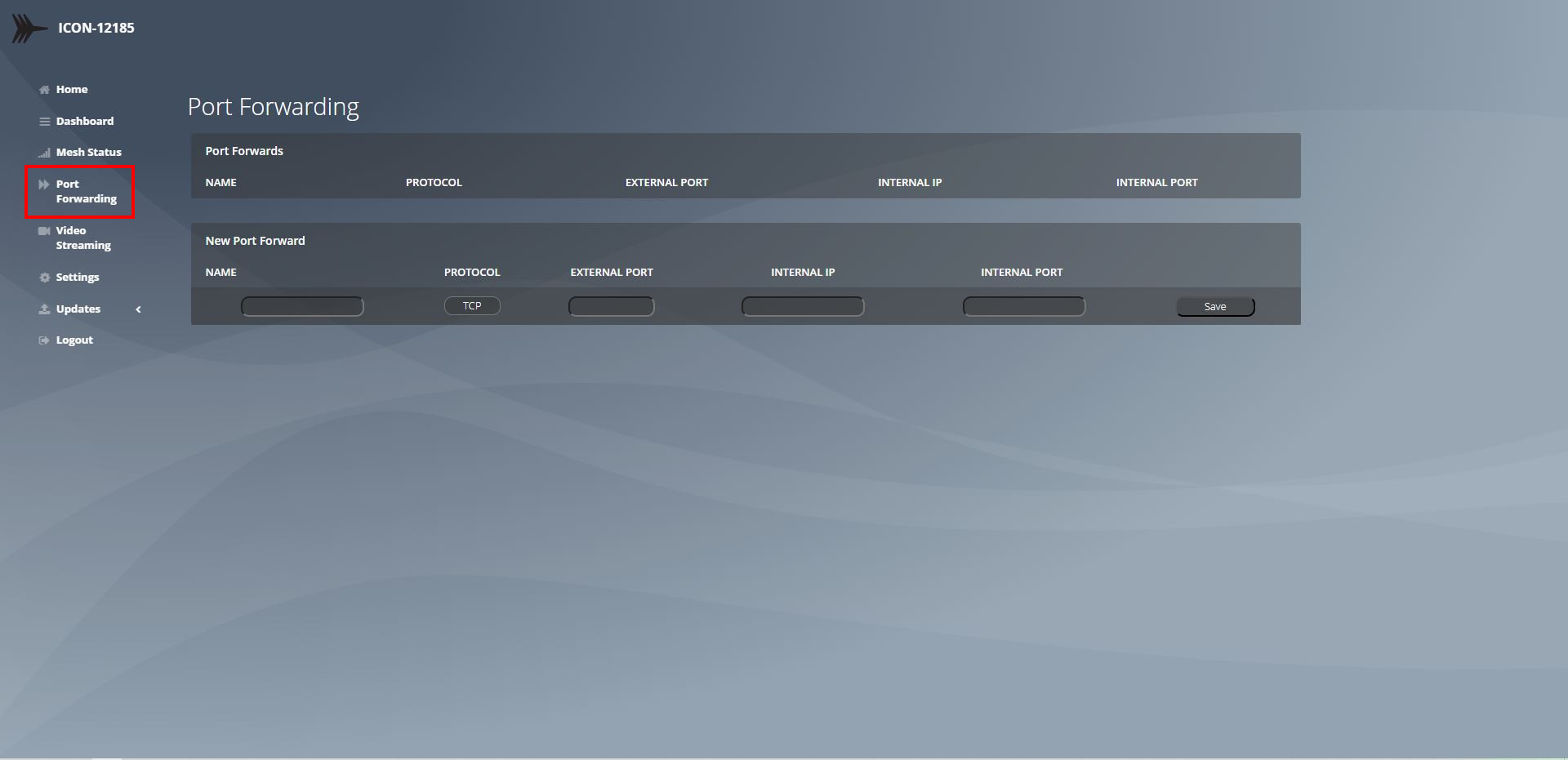
Add the required information and click save to add the port forward.

Entries created with this method must have an external port between 1000 and 2000
For more advanced options, see Advanced Port Forwarding
Example: Configuring an RTSP camera
use the following setup to configure a camera feeding an RTSP stream at the URI :"rtsp://<camera-ip>/stream1"
Configure the device networking to use a static IP address in the reserved IP range eg.
10.10.1.100, leave the RTSP port at it’s default of 554Add a port forward using the web interface as described above:
Name: “Camera Payload”
Protocol: TCP
External Port: 1050
Internal IP: 10.10.1.100
Internal Port: 554
The RTSP stream will now be accessible by devices connected to the ground station using the URI
rtsp://icon-<serial#>:1050/stream1